How to Register at SpinBetter — Complete Guide
Creating a SpinBetter account is quick and straightforward. The entire process takes under two minutes, and you can start browsing the platform immediately after signing up. Here's every step in detail.
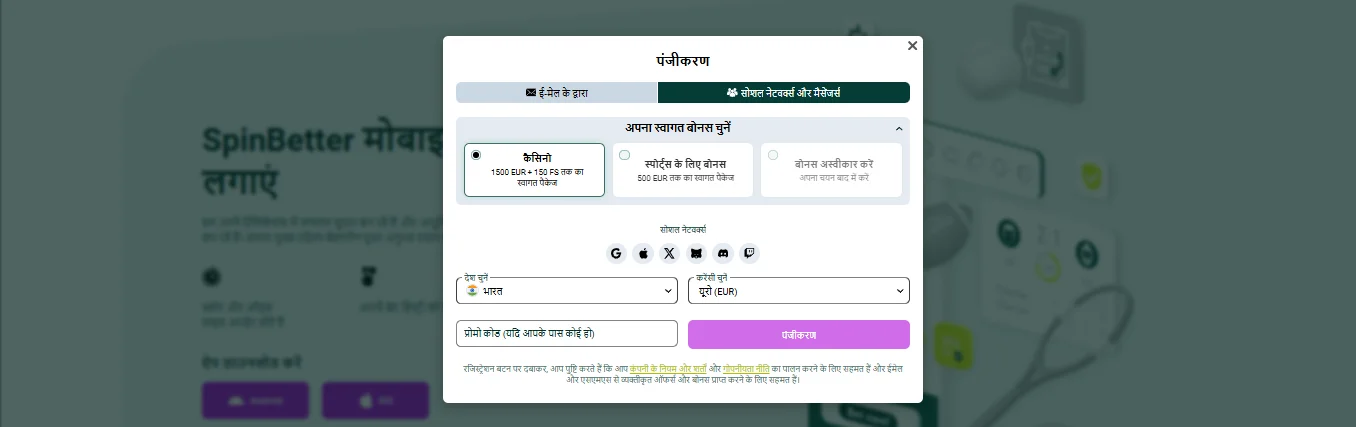
- Go to the official website and click the Registration button in the top right corner. You'll see a popup form with two tabs: "By Email" and "Social Networks and Messengers".
- Choose your registration method. Email registration asks for your email and a password. Social registration lets you sign up instantly through Google, Apple, X (Twitter), Discord, or Telegram — no password needed.
- Select your welcome bonus type. This is the most important step. You'll see three options: Casino (up to €1,500 + 150 FS), Sports (up to €500), or Decline Bonus. Pick the one that matches how you plan to play. This choice is permanent.
- Choose your country and currency. Select India from the country dropdown. For currency, select INR (Indian Rupees) to deposit and withdraw in your local currency without conversion fees. The promo code field appears at the bottom — enter your code here if you have one.
- Complete registration. Click the Register button. If you used email, check your inbox for a verification link and click it. Social signups are verified automatically.
- Activate your bonus in Account Settings. Go to your account settings and ensure you've opted in to the correct bonus type (casino or sports). Without this step, your first deposit won't trigger the welcome bonus.
SpinBetter Sign-Up Methods Compared
Email registration gives you a traditional account with a password you control — easy to recover if you ever get locked out. Social registration is faster (one click) but ties your SpinBetter account to that social provider. If you ever lose access to your Google or Telegram account, recovering SpinBetter access becomes more complicated.
Our recommendation: use email registration for a standalone account, then add social login as a secondary option later in your account settings.
Choosing Between Casino and Sports Welcome Bonus
This decision depends entirely on how you plan to use SpinBetter. If you're primarily interested in slots, live dealer games, and the casino section, choose the casino package — the €1,500 + 150 free spins offer has significantly more raw value. If cricket betting, football accumulators, and the sportsbook are your focus, the sports package with its lower x5 wagering requirement is much easier to clear.
For a full comparison of both packages with wagering math examples, check our SpinBetter bonuses breakdown.
After Registration — What to Do First
Once your account is live, complete these steps before depositing:
- Verify your email if you haven't already — some features are restricted until this is done.
- Complete your profile — add your phone number and activate it. This is required for bonus eligibility.
- Double-check your bonus opt-in in Account Settings. If the toggle for your chosen bonus type isn't active, your deposit won't trigger the welcome offer.
- Start the KYC process early. You'll need to submit identity documents before your first withdrawal. Uploading them now means no delays when you're ready to cash out.
Once everything is set up, make your first deposit and the welcome bonus will credit automatically. Need help with payments? See our SpinBetter deposit and withdrawal guide.
Troubleshooting SpinBetter Registration Issues
Registration form not loading: Try a different browser or disable your VPN temporarily. Some VPN servers trigger geo-blocks.
Verification email not arriving: Check your spam/junk folder. If it's not there, use the "Resend" option on the login page or contact support via live chat.
Duplicate account error: SpinBetter allows only one account per person, household, and IP address. If someone in your household already has an account, creating a second one violates the terms and may result in both accounts being restricted.
SpinBetter Registration FAQ
Visit the official site, click Register, choose email or social signup, select India as your country, pick a currency, choose your welcome bonus type, and optionally enter a promo code. Takes under 2 minutes.
Just an email address or a social account (Google, Apple, Telegram, etc.) and your country selection. Full ID verification is required later before your first withdrawal.
No — the choice between casino and sports is permanent. Switching mid-package or declining a bonus forfeits all remaining deposit bonuses in the welcome sequence.
Yes, completely free. You only need money when you want to place bets or play casino games. You can browse the sportsbook and demo slot games without depositing.